
Product details
PS5 DualSense Edge Stick Module in Kenya
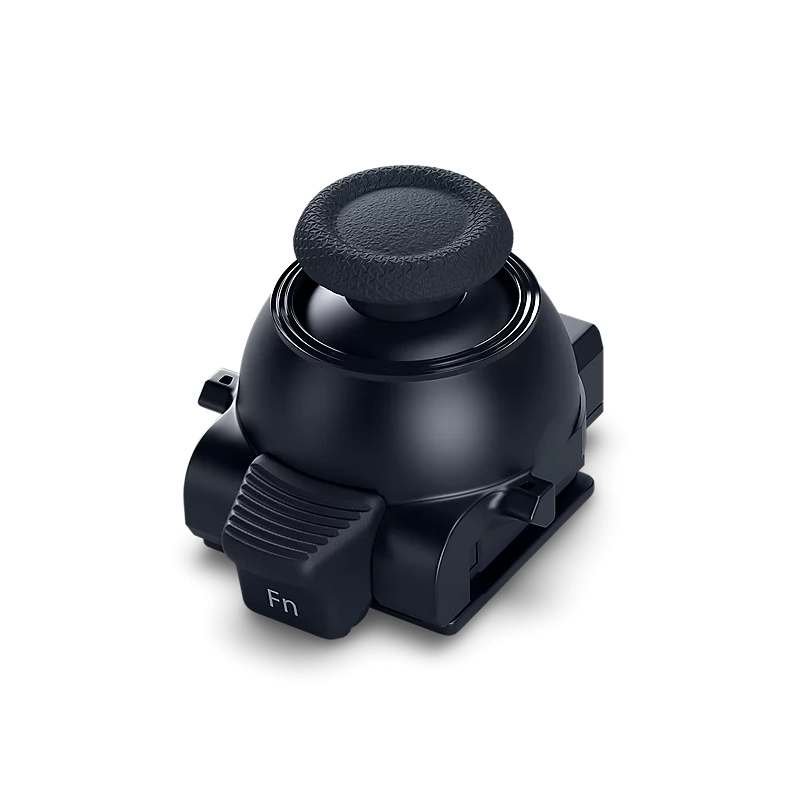
The PlayStation DualSense Edge Stick Module price in Kenya is KES 7,500. It is a replacement component designed specifically for the DualSense Edge Wireless Controller, allowing gamers to replace an existing stick module without replacing the entire controller. This provides a practical way to maintain the controller’s performance and extend its useful life.
The DualSense Edge Stick Module is designed for easy replacement and can be installed on either the left or right side of the controller. This is particularly useful for gamers who want to maintain precise analogue control over movement, aiming and other in-game actions while continuing to use their existing DualSense Edge controller.
Unlike the standard DualSense controller, the DualSense Edge features replaceable stick modules, giving users greater flexibility when maintaining their controller. When a module needs to be replaced, the release mechanism on the DualSense Edge allows the existing unit to be removed and a replacement installed securely.
Each package contains one stick module and one standard stick cap. The module is interchangeable between the left and right stick positions, making it suitable for replacing either side of a DualSense Edge controller.
The PS5 DualSense Edge Stick Module is compatible only with the DualSense Edge Wireless Controller and should not be purchased as a replacement for the standard PS5 DualSense Wireless Controller.
At it current price point, the DualSense Edge Stick Module offers a more practical maintenance option for owners of Sony’s premium PS5 controller. Instead of replacing an entire controller when a stick module requires attention, gamers can replace the individual component and continue using the DualSense Edge with its customisable controls and familiar ergonomic design.
buy the at PS5 DualSense Edge Stick Module at Phoneplace Kenya.
What’s in the Box?
- 1 Stick Module with standard cap
- User manual
How to Replace the Module
- Power Off: Turn off the controller and unplug any cables.
- Release Cover: Slide the Release latch on the back of the controller to pop off the front faceplate cover.
- Lift Lever: Raise the small metal release lever next to the faulty thumbstick module.
- Swap Modules: Slide the old module out, clear away any dust, and slide the new one firmly down the grooves.
- Lock & Close: Push the metal lever back down until it clicks, then snap the faceplate cover back on.
Alternative Gaming Accessories
- Verbatim Vi7000G PCIe NVMe M.2 SSD
- Logitech Flight Simulator Rudder Pedals
- Turtle Beach Recon 70 Headset
- PS5 VR2 PC Adapter
Explore more Gaming Accessories at Phoneplace Kenya.


There are no reviews yet.